Citi Mobile®
- 4.8
- Rating
- 10.00M
- Installs
- Free
- Price

 Analysis by App-foxy
Managing money from a phone sounds simple until you need to check a recent purchase, move money between accounts, pay a bill, or confirm that a card transaction is yours while you are away from home. I spent time using Citi Mobile® as a day-to-day finance app, and my overall impression is that it works best when treated as a regular money routine rather than an emergency tool. It brings common Citi account tasks into one mobile workspace, but the real benefit comes from building a few repeatable habits around it.
Developed by Citibank N.A., this free finance app is aimed at Citi customers who want practical account access without relying on a desktop browser. It is available for Everyone, runs on devices using OS 10 or later, and the current version is 9.91.1. The app has been around since September 22, 2011, which helps explain why it feels like a mature banking product rather than a newly assembled mobile shell.
Its public reception is also strong: Citi Mobile® holds a 4.8 average from around 1.3 million ratings, with more than 400,000 written reviews, and it has passed 10 million installs. Those figures do not replace personal testing, but they do suggest that the app has become a familiar part of many customers’ banking routines. I found that its strongest quality is not excitement; it is the ability to make ordinary account checks and payments feel predictable.
You May Also Like

 Blood Strike: 2.5 Anniversary
Blood Strike’s Loadouts Turn Every Drop Into a Tactical Gamble
A close look at Blood Strike’s custom loadouts: how fast access to signature weapons reshapes its battle royale rhythm, rewards preparation, and narrows the gap between fights.

 Pandora - Music & Podcasts
Pandora’s Music Is Easy to Start, but Harder to Recover
Pandora’s strength is its low-effort path from a seed to a station. Its weak spot is how much confidence it asks you to place in connection, setup, and quiet recovery.

 8 Ball Pool
 Is Built on Rivalries, Rematches, and Routine
A close look at the rivalries, rematches, shared routines, and unanswered safety questions that turn a quick pool match into a persistent mobile community.

 Samsung Music
’s Quiet Strength Is Playing What You Already Own
Its reach comes less from spectacle than from dependable access to a personal library. That simplicity is both the app’s strongest retention engine and its ceiling.

 AccuWeather: Weather Radar
AccuWeather Review: A Quick, Clear Forecast for Everyday Decisions
For everyday plans, the best forecast is the one you can understand quickly. AccuWeather makes rain timing, radar, and local conditions easy to act on, with a few trade-offs.

 Hill Climb Racing
Why Hill Climb Racing Still Turns Crashes Into One More Run
A tiny car, a bumpy hill and one more upgrade: Hill Climb Racing keeps resurfacing because its simple chaos makes every near-miss feel personal.
More From Our News Desk



How I use the app for a dependable daily routine
I begin with the moments that tend to cause hesitation: a sign-in that does not go as expected, an account detail that seems unfamiliar, or uncertainty about whether a payment went through. I treat those as separate questions rather than tapping around at random, because each calls for a different check. That distinction leads naturally to a few simple setup habits that make routine use feel more predictable.
The basic workflow is quick once the account layout becomes familiar
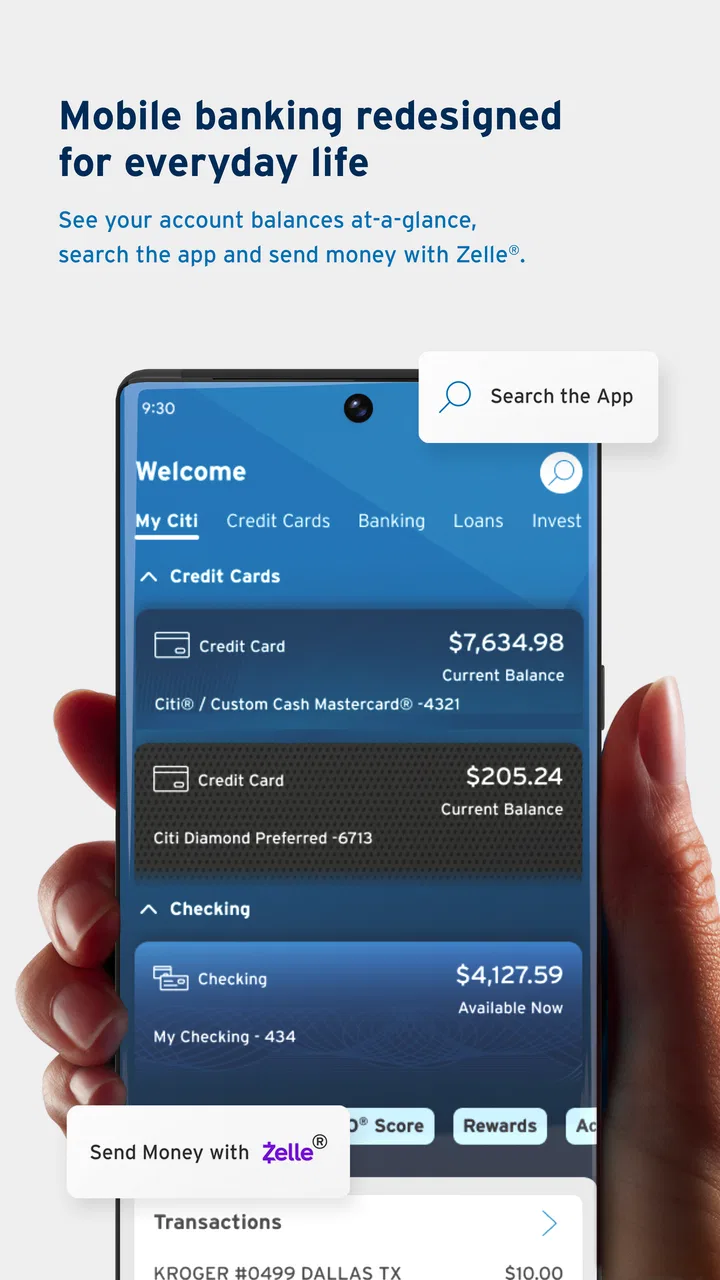
My normal starting point is the account overview. I use it to check balances, scan recent activity, and decide whether I need to take action. That first glance is more useful than opening the app with a vague intention to “manage finances,” because it turns the session into a short checklist: verify what changed, handle anything due, and leave.
The most practical use case is a busy weekday. Imagine paying for lunch, receiving a notification about a card purchase, and later wondering whether a larger transaction has posted. Instead of waiting until I am at a computer, I can open the app, review the activity, and compare the transaction details with my own records. If something looks unfamiliar, seeing it quickly gives me a better chance to investigate while the context is still fresh.
I also like using the app before making a planned payment. Checking the destination account and available balance first reduces the chance of moving money based on an outdated assumption. That may sound obvious, but this two-step habit is more valuable than rushing through a transfer simply because the app makes the action accessible.
For card users, the app is most useful when it becomes part of a regular review cycle. I do not wait for the end of the month to look at activity. A short check after major spending helps separate expected purchases from transactions that need attention. This is especially helpful when several household members use related accounts or when recurring charges are easy to forget.
What the app does well for ordinary account management
Citi Mobile® is well suited to people who already bank with Citi and want their phone to handle the everyday layer of account management. Checking balances, reviewing transactions, and dealing with routine payments are the kinds of jobs where mobile access saves time without requiring a complicated process.
The interface feels most comfortable when I use it for one purpose at a time. I open it to inspect activity, make a payment, or check an account, rather than trying to conduct a complete financial review from a small screen. That distinction matters. A phone is convenient for confirming a decision; it is less comfortable for studying a long history or comparing many categories of spending side by side.
I would recommend it to a Citi customer who travels, works away from a desk, or simply prefers to handle banking in short sessions. It is also useful for someone who wants to check an account before a purchase instead of relying on memory. The app’s value comes from reducing the distance between noticing a financial question and answering it.
Where the desktop alternative still makes more sense
I would not make the mobile app my only environment for every banking task. When I need to read a long sequence of transactions, save detailed notes, or compare information across several windows, a desktop browser is easier on my eyes and more efficient. The app is a strong companion, not automatically a replacement for every larger-screen workflow.
This is an important trade-off for anyone choosing between the usual alternatives. A browser offers more room and can feel better for deliberate financial planning. Citi Mobile® wins when speed, portability, and immediate account awareness matter more than a wide layout. If you mainly perform occasional, detailed reviews and rarely need access while away from home, the browser may remain your preferred option.
Settings, shortcuts, and habits that make it more useful
Before relying on the app for a time-sensitive task, I make sure I can sign in calmly and recognize the account information I expect to see. I also review the choices available in the app’s settings instead of assuming every alert or shortcut is useful to me. With those basics in place, it becomes easier to recover from a confusing moment without repeating actions or acting on a guess.
Start with the settings that affect how often you check
After installing a banking app, many people open it once, sign in, and never revisit its settings. I think that is a mistake. The useful approach is to inspect the available account, security, and notification choices early, then adjust them to match your real routine. I avoid assuming that every alert is helpful; too many messages can make important activity easier to overlook.
My preference is to keep alerts that help me notice meaningful account activity and review the rest periodically. The exact choices available can depend on the account and the app’s current presentation, so I treat the settings screen as something to inspect rather than something to configure from a generic checklist. The goal is simple: make the app bring attention to information I would genuinely act on.
A good notification habit is to use an alert as a prompt for verification, not as proof that everything is correct. When I see a purchase notification, I still open the activity details when the amount or merchant seems unfamiliar. That extra step prevents a quick glance from becoming false reassurance.
Build a repeatable check instead of opening the app randomly
The most effective shortcut is behavioral. I associate a short app check with moments that already exist in my day, such as after a major purchase or before handling a scheduled payment. This is more reliable than promising myself that I will “check later.” A consistent trigger turns account review into a small maintenance task.
For example, I can use a three-part routine: look at the balance, scan the newest activity, and deal with any item that needs action. I do not linger when nothing has changed. If I find a transaction that needs investigation, I note what I need to verify before leaving the app. This keeps casual checking from becoming an endless scroll.
Another useful habit is separating observation from action. First I confirm the account and transaction details; only then do I make a payment or transfer. On a small screen, this pause is worthwhile because it reduces the risk of choosing the wrong account or acting on a number I misunderstood.
Use the app as a confirmation layer for larger financial habits
Citi Mobile® is not a substitute for a personal budget, but it can support one. I use the app to confirm what actually posted, while a separate note or budgeting method helps me remember what I intended to spend. Keeping those roles separate makes the app easier to use: it provides current account information, while my own system provides context.
This approach is particularly helpful with recurring charges. I do not rely on a single monthly review to remember every subscription or automatic payment. Instead, I scan activity when I have a natural reason to open the app and compare unexpected changes with my own list. The app is better at showing what happened than explaining why it happened, so that second layer remains my responsibility.
For families or shared finances, I would also recommend agreeing on a simple review habit rather than repeatedly checking the same account without a plan. One person can verify recent activity, another can confirm an expected payment, and both can use the app’s current account information as a common reference. The benefit is less about a special feature and more about avoiding assumptions.
Small-screen efficiency has real limits
There is a point where mobile convenience becomes friction. Entering or reviewing a lot of information on a phone is slower than working with a keyboard and a larger display. If I am trying to understand a long period of spending, the app can feel better for locating individual transactions than for building a complete financial picture.
I also prefer not to rush sensitive actions while distracted, traveling, or using an unreliable connection. A banking app may make an action available at any time, but availability does not mean every moment is a good moment to use it. I would rather wait until I can verify the details than turn convenience into avoidable stress.
Faster patterns for experienced users
When a screen or transaction does not look right, I pause before submitting anything again. I check the account and activity details, then use another Citi channel if the app cannot answer the question clearly; repeated attempts can create more uncertainty than they solve. This section focuses on that measured recovery approach, including how to tell a routine navigation snag from a question that needs more context.
Use a “check, confirm, act” sequence
The fastest safe pattern I found is not simply tapping quickly. It is reducing unnecessary decisions. I check the account overview, confirm the relevant transaction or balance, and then perform the single action I came to complete. This avoids opening several areas without knowing what I am looking for.
When paying a bill, for instance, I first confirm which account I am using and whether the payment information matches my intention. I then review the final details before submitting. The extra confirmation is a better shortcut than correcting a rushed mistake later.
For transfers, I use the same discipline. I identify the source, verify the destination, and check the amount before completing the action. Experienced users often move faster because they have fewer doubts, not because they skip verification. The app supports that style well when I prepare the decision before opening the relevant screen.
Turn transaction review into a search for exceptions
Reading every transaction with equal attention is tiring. I get more value by looking for exceptions: an unfamiliar merchant, an amount that differs from what I expected, a duplicate-looking charge, or a payment that appears at an unusual time. Familiar activity can be acknowledged quickly, while exceptions deserve a closer look.
This method makes the app more useful for people with frequent card activity. Instead of treating the activity list as a report that must be studied from top to bottom, I use it as a stream of signals. That reduces the time spent checking routine purchases while keeping attention on entries that could affect my account.
Keep a personal record for decisions the app cannot make for you
The app shows account activity, but it cannot know whether a purchase was wise, whether a bill fits my monthly plan, or whether a transfer supports a longer-term goal. I keep those judgments in a separate budget or note. That separation is one of the most important practical insights for using a banking app well.
Without it, there is a temptation to mistake a current balance for a complete picture of financial health. A balance can look comfortable while upcoming obligations are still waiting. I use Citi Mobile® for the current facts and my own planning system for the decisions built on those facts.
Know when a task should move to another channel
One of the app’s strengths is that it makes routine access convenient. Its limitation is the same: a compact mobile workflow is not always the best place to resolve a complicated issue. If a transaction requires extensive research, if I need to compare many records, or if the situation is urgent and sensitive, I do not force the app to carry the entire conversation.
I start with the app when it can answer the basic question quickly. If it cannot, I move to the appropriate Citi support or browser channel rather than repeatedly refreshing or guessing. That is not a failure of the app; it is a sensible boundary between self-service account access and more involved assistance.
Important limits before you make it your main banking tool
I do not assume every delay or unexpected account detail originates in the app. A transaction may need time to appear as expected, while a complicated account question may require information beyond a quick mobile check. Knowing when to stop troubleshooting on a phone is useful in its own right, and it sets up a realistic verdict about who benefits most from making this app part of a regular banking routine.
It is primarily for Citi customers
The most obvious limitation is also the most decisive: this app makes sense when you use Citi accounts. Someone looking for a neutral finance dashboard that combines unrelated banks, investments, wallets, and budgeting tools may be better served by a dedicated aggregation or budgeting app. Citi Mobile® is focused, and that focus is useful only if it matches your financial setup.
I would also skip it as a primary tool if your main goal is detailed financial analysis. The app can help you inspect account activity and handle practical tasks, but it is not the same as a full budgeting workspace. People who want extensive categorization, long-range planning, or broad multi-bank comparisons should look for a tool designed around those needs.
Convenience does not remove security responsibility
Because the app puts account access in a phone, I treat device security and sign-in habits as part of the experience. I avoid leaving sensitive sessions open unnecessarily, and I do not make important decisions from a rushed glance at a notification. The app can make access easier, but the user still has to protect the device and verify unexpected activity carefully.
I also expect the exact layout and available controls to change as the app is updated. That means I rely on the labels and choices visible in my own installation rather than memorizing an old sequence from a guide. If a control moves, the underlying habit remains useful: identify the account, verify the details, and confirm the action.
Availability is not the same as suitability for every situation
The app’s anytime, anywhere appeal is strongest for short, low-friction tasks. It is less convincing when I am trying to solve a complicated account problem from a noisy place or on a small screen. A mobile banking app can give me immediate information, but immediate information is not always enough to resolve a dispute or make a complex decision.
That is why I see the app as one part of a sensible banking setup. It handles quick checks and routine actions; a browser, personal records, or direct support can handle situations requiring more space, context, or explanation. Users who understand that division are likely to find it more dependable than users expecting one app to replace every financial tool.
My verdict after building a repeatable routine
I recommend Citi Mobile® to Citi customers who want a practical way to stay close to their accounts. Its free price, Everyone age rating, broad adoption, and high average rating make it easy to consider, but my recommendation is based more on how well it supports ordinary habits: check recent activity, confirm balances before acting, handle routine payments, and investigate exceptions promptly.
The app is at its best when I use it deliberately. Notifications can prompt a review, the account overview can provide a quick starting point, and a simple check-confirm-act pattern keeps routine work from becoming careless. Those habits are more valuable than trying to discover a magical shortcut, because they make the app useful across different days and different financial situations.
I would choose a desktop browser for extended account research, and I would choose a separate budgeting tool for detailed planning across several institutions. I would also avoid treating the app as a complete answer to complicated support issues. Its role is narrower but genuinely useful: it gives Citi customers a convenient, current view of their banking and a way to complete common tasks without waiting to reach a computer.
For me, that is enough to make it a worthwhile everyday finance app. The best results come from combining its quick access with careful verification and a personal money routine. If that matches the way you manage your accounts, Citi Mobile® is easy to recommend. If you need broad financial aggregation or deep analysis, it is better used as a companion to another tool rather than as your entire system.
FAQs for Citi Mobile®
01What features does Citi Mobile® offer for managing my accounts?
Citi Mobile® provides a comprehensive suite of features for managing your accounts, including real-time account balances, transaction history, and bill payment options. You can also transfer funds between Citi accounts, deposit checks using mobile deposit, and access customer service through the app. Additionally, Citi Mobile® offers personalized notifications and alerts to keep you informed.
02How secure is my information on the Citi Mobile® app?
Citi Mobile® employs advanced security measures to protect your information. This includes biometric login options such as fingerprint and facial recognition, end-to-end encryption, and real-time fraud monitoring. The app also regularly updates its security protocols to stay ahead of potential threats, ensuring your data remains safe and confidential.
03Can I use Citi Mobile® for international transactions?
Yes, Citi Mobile® supports international transactions, allowing you to manage your accounts and conduct currency exchanges with ease. The app provides up-to-date exchange rates and the ability to transfer funds internationally, making it a convenient tool for global banking. However, it's important to be aware of any applicable fees and restrictions based on your account type.
04Does Citi Mobile® offer any budgeting or financial planning tools?
Citi Mobile® includes several features to help you manage your finances effectively. It offers budgeting tools that allow you to track your spending, set financial goals, and receive insights into your financial habits. The app also provides personalized advice and recommendations based on your spending patterns, helping you make informed financial decisions.
05Is there customer support available through Citi Mobile®?
Citi Mobile® offers a robust customer support system directly within the app. You can access a variety of support options, including live chat, FAQs, and contact details for phone support. Whether you need assistance with transactions, account issues, or technical support, Citi's customer service team is readily available to help.
Pros
- User-friendly interface for easy navigation.
- Comprehensive financial management tools.
- Secure login with biometric authentication.
- Real-time transaction alerts and updates.
- Quick access to recent transactions.
Cons
- Occasional app crashes can disrupt use.
- Limited features compared to desktop site.
- Some users report slow customer support.
- Requires frequent updates for bug fixes.
- Complex setup for new account linking.

Citi Mobile®
Gallery